Key Considerations When Developing Agents

Essential considerations for building robust LLM agents in production, covering branching logic design, database integration, and observability implementation.
When building LLM agents in production environments, there are many easily overlooked elements beyond the obvious ones - from designing branching logic and database integration to implementing observability. Based on recent project experience, this post compiles practical tips that proved genuinely helpful: developing branching nodes with DSPy, streamlining DB integration using MCP Toolbox for Databases, and building observability around Langfuse. Each section focuses on immediately applicable methods, so I hope this serves as a useful reference for elevating both your team’s agent quality and deployment velocity.
Developing LangGraph Branching Nodes with DSPy

Image generated using ChatGPT
When developing agents with LangGraph, we often use conditional edges (Conditional Edge) to handle flow branching. For example, determining whether a user’s question in a chatbot is topic-related or not. In such cases, we typically proceed with the following LangGraph node code and process for handling branches:
- Write a classification prompt
- Classify user input using LLM + the written prompt
- Manually modify the prompt while checking results
def classification_node(state: LangGraphState) -> dict:

    message = state.messages[-1] #  Load the most recent message

    classification_prompt = f"""
    You are a question classifier. Read the user's question, determine if the question is topic-related, and return the result and confidence score in the following JSON format:
    {
        "label": "positive" | "negative",
        "score": 0.44
    }

    Here are some examples:
    "How's the weather today?" -> "negative"
    "Show me this month's MAU" -> "positive"
    """

    # Initialize the classifier pipeline
    llm = ChatOpenAI(model="gpt-4o-mini")

    chain = llm | JsonOutputParser()

    # Run classification
    result =  chain.invoke(message)

    # Return structured result
    return {
        "label": result["label"],
        "score": round(result["score"], 2)
    }
While this approach worked fine during the initial prototyping stage, when I tried to create a more accurate and maintainable version, the process felt quite inefficient.
Developing nodes this way requires testing expected questions one by one to judge node accuracy, making the debugging process lengthy and unable to guarantee accuracy when actually deployed.
To solve this problem, I searched for more systematic prompt engineering techniques and discovered a Python package called DSPy. (For detailed information about DSPy, please refer to my DSPy post and the DSPy official documentation.)
DSPy helps move away from guess-work prompting techniques toward systematic, data-driven prompt design. Additionally, DSPy supports experiment tracking with MLFlow, making the prompt optimization process transparent. After discovering DSPy, when developing such branching nodes in LangGraph, I moved away from traditional prompting engineering techniques and used the following process:
- Write 5-10 expected questions (or inputs) or extract them from past experiment log records
- Generate additional question data (around 40-60) using ChatGPT
- Apply labels to each question
- Split into train dataset and test dataset for prompt optimization
- Proceed with prompt optimization using the generated dataset and DSPy’s
MiPROv2algorithm - Track classification accuracy with MLFlow
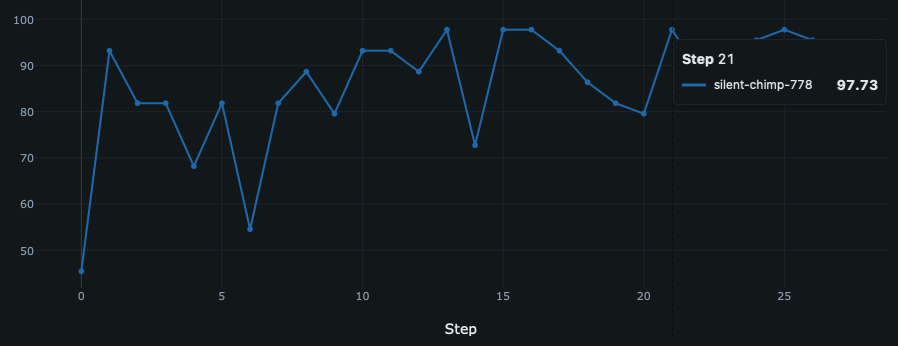
Prompt engineering classification accuracy tracked with MLFlow
Developing this way allows us to numerically verify whether prompts work well, and I confirmed that nodes operate with quite high accuracy even for new questions when actually deployed.
Streamlining Agent DB Integration with MCP Toolbox for Databases

Source: MCP Toolbox for Databases Official Documentation
MCP toolbox for Databases (MtD for short) is a database MCP server generation tool developed by Google with a rather long name. It supports various databases (including PostgreSQL), making it applicable to a wide range of projects. MtD simplifies the database MCP server development process that typically requires writing code, enabling MCP server deployment without boilerplate code - just by writing a simple yaml file and running one bash script line as shown below.
sources:
  my-pg-source:
    kind: postgres
    host: ${DB_HOST}
    port: ${DB_PORT}
    database: postgres
    user: ${USER_NAME}
    password: ${PASSWORD}
tools:
  search-hotels-by-name:
    kind: postgres-sql
    source: my-pg-source
    description: Search for hotels based on name.
    parameters:
      - name: name
        type: string
        description: The name of the hotel.
    statement: SELECT * FROM hotels WHERE name ILIKE '%' || $1 || '%';
  search-hotels-by-location:
    kind: postgres-sql
    source: my-pg-source
    description: Search for hotels based on location.
    parameters:
      - name: location
        type: string
        description: The location of the hotel.
    statement: SELECT * FROM hotels WHERE location ILIKE '%' || $1 || '%';
After writing the YAML file, server deployment is as simple as one command line:
toolbox --tools-file "tools.yaml" --ui

INFO "Toolbox UI is up and running at: http://localhost:5000/ui"
After deployment is complete, you can check the logs and access the address where the MCP server is deployed to view the list of available tools through the UI.
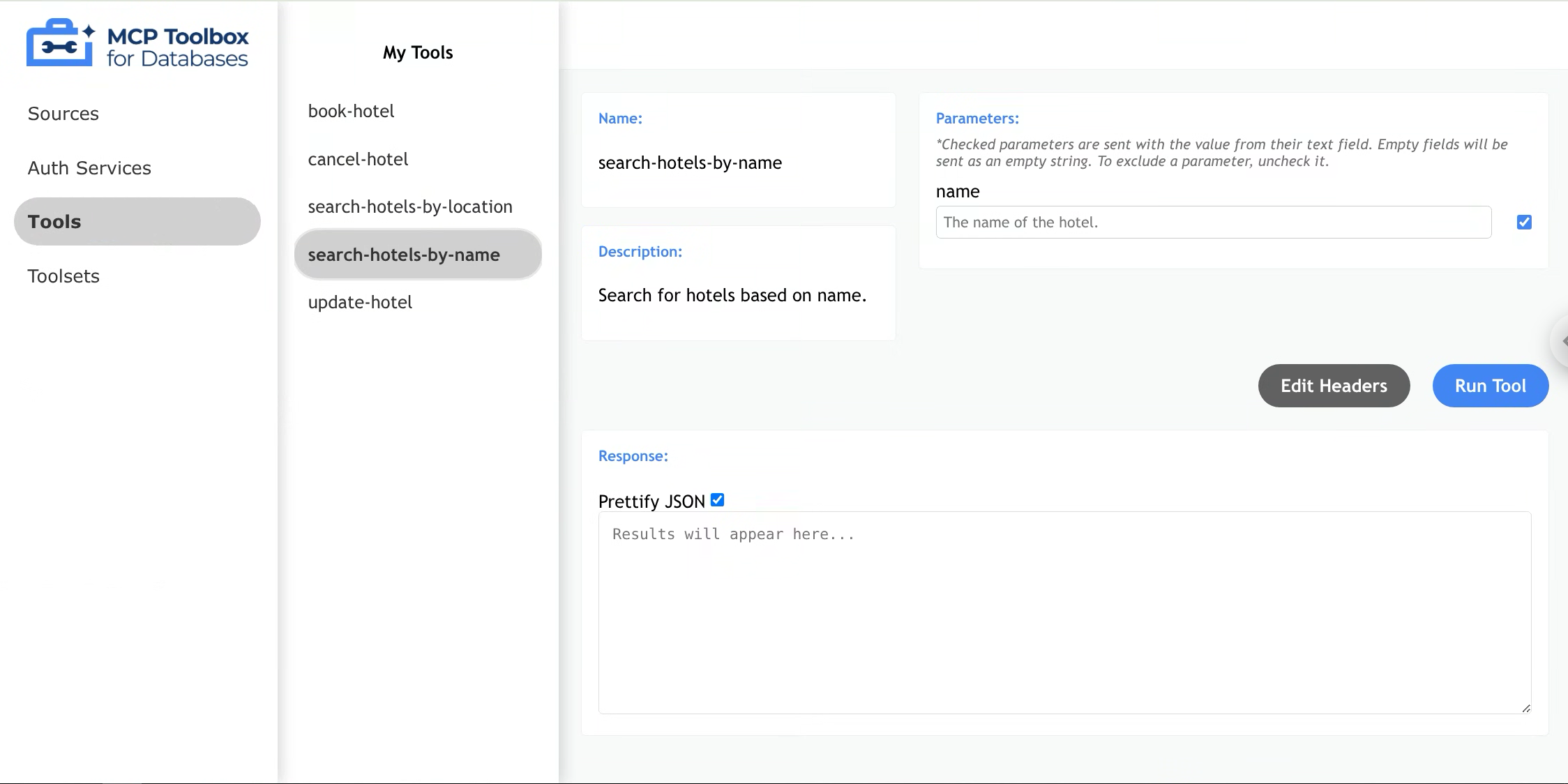
MCP toolbox for Databases UI
This tool has two main advantages. First, it dramatically reduces development time for database-related MCP servers. The convenience of being able to use an MCP server immediately with just a YAML file that toolifies necessary queries and a one-line Bash script made it attractive for project applications.
It also reduces the time agents need to load data related to questions or topics. When integrating agents with databases, text-to-SQL is commonly used. However, even for simple queries, the latency to final answers can accumulate through RAG application, query validation, and rewriting processes. MCP Toolbox for Databases allows LLM agents to directly extract relevant data from databases by simply calling the necessary tools when frequently used queries are toolified, significantly reducing response times.
Observability

Image generated using Google Nano Banana
In agent development and debugging, just like other development work, observability to check intermediate states is crucial. Especially when developing agents with LangGraph, as agents become more sophisticated, nodes and edges multiply significantly. Without an easy way to check the process by which agents generate answers, it becomes difficult to understand why agents produced specific answers or which nodes aren’t functioning properly.
Additionally, having an observability system that records questions an