How LLM Agents Call Tools

How LLMs call tools
How LLM Agents and Tool Calling Work
One of the most exciting concepts in natural language processing today is the LLM Agent (Large Language Model Agent). We’re witnessing a remarkable evolution from LLMs that simply generate text to dynamic systems that can call external tools and continue reasoning based on execution results.
In this post, I’ll explain:
- What LLM agents are
- How Tool Calling actually works
What are LLM Agents?
An LLM agent is literally “an agent that uses a language model to perform tasks by leveraging external tools.” While LLMs like GPT and Claude possess powerful natural language processing capabilities, they can’t directly perform tasks like calculations, searches, or API calls.
Therefore, LLM agents consist of the following components:
- LLM: Determines when to use tools, which tools to call, and with what parameters
- Tool List: External functions that the model can invoke
- Orchestrator: Executes the tools requested by the model and feeds the results back
Orchestrator / Framework
The medium that handles requests and results between the LLM and tools is called an orchestrator or framework.
LangChain is a prime example of an LLM framework. It reads tool call information output by the LLM, executes the actual tools, and passes the results back to the model.
LangChain’s role includes:
- Defining and registering tools (using decorators like @tool)
- Providing the model with tool lists and schemas
- Actually executing tools when the model requests tool calls
- Receiving results and passing them back to the model to guide subsequent reasoning
In essence, LangChain is the vital link that makes LLM agents actually functional.
LLM and Tools
So how does an LLM know which tools to use and when? Let’s examine this step by step.
System Prompt
In LLM Agents, the System Prompt is a fixed message that sets the model’s overall behavior in conversations. For example, it might be structured like this:
"You are an intelligent AI assistant capable of utilizing various external tools.
Based on user questions, you should select and call the most appropriate tools from the list below.

## Tool List:
  {
    "name": "SearchWeb",
    "description": "Searches for information on the web.",
    "parameters": {
      "type": "object",
      "properties": {
        "query": {"type": "string", "description": "Keywords to search for"}
      },
      "required": ["query"]
    }
  },
  {
    "name": "Calculator",
    "description": "Performs simple mathematical calculations.",
    "parameters": {
      "type": "object",
      "properties": {
        "expr": {"type": "string", "description": "Mathematical expression, ex: '12 * 8 + 3'"}
      },
      "required": ["expr"]
    }
  }

### Tool Calling Method:
• Specify only one action tool call in JSON format under the "Action:" item.
• The JSON object must follow this format:
```json
{
  "action": "<tool_name>",
  "action_input": { /* parameters to pass to the tool */ }
}"
The way to inform the LLM about tool types and usage is by inserting tool descriptions as strings into the System Prompt. To ensure the LLM understands the tools properly, tool descriptions should include at least these elements:
- Tool name
- Tool description
- Tool input variables and their data types
- Required input variables for the tool
Processing User Input
When a user inputs both the system prompt and their desired question to the LLM, the model references the tool list in the system prompt and returns a tool usage JSON response in natural language format (string). For example, if a user asks the agent What new models did OpenAI release today?, the LLM would return a response like this:
[{
    "type": "function_call",
    "action": "SearchWeb",
    "action_input": "{\"query\":\"OpenAI latest model\"}"
}]
Framework Processing
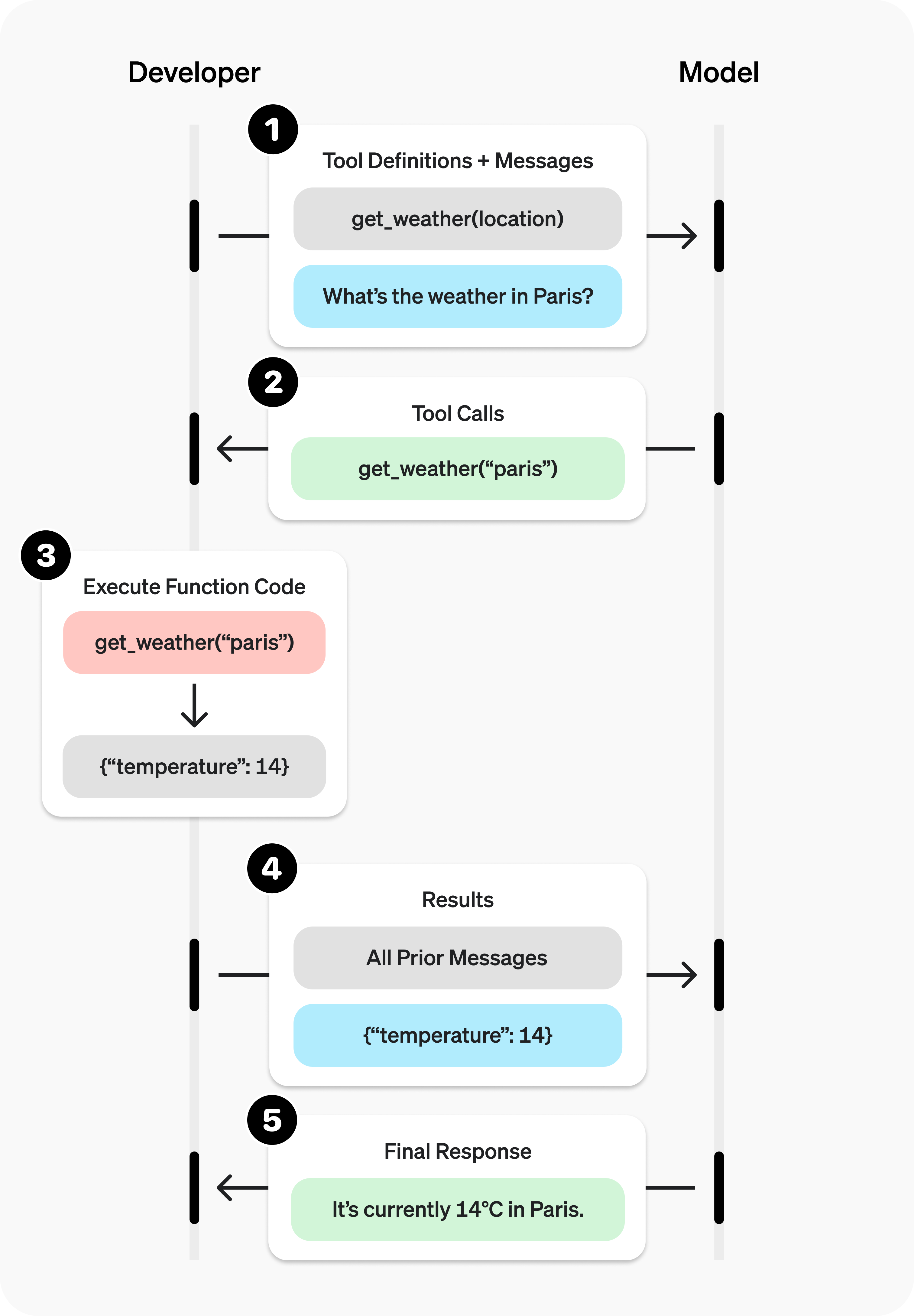
The LLM framework (e.g., Langchain) receives the LLM’s response, calls the requested tool (function), inserts the input variables generated by the LLM, and produces tool results. The results generated by the tool are then input again along with the LLM’s system prompt and user question to derive the final answer. You can understand how this flow works by referring to the diagram below.

Source: saf
Summary
The way LLMs call tools can be summarized with the diagram below. In my next post, I’ll explore how LLMs are trained for tool calling and what datasets are used in this process.